advanced
tools
New workflows
for footwear development.
New workflows
for footwear development.
New workflows
for footwear development.
Bridging the gap between research, scientific literature and market demand.


Features
New World Grading Tool
[Blender edition]
New World Grading Tool
[Blender edition]
New World Grading Tool
Blender edition
Automates shoe size grading in Blender, generating all production sizes from a single reference design while maintaining real-world sizing relationships.
One-Click Grading Generation
Lattice-Based Size Grading
Pair Mode Processing
CSV-Driven Sizing Standards
Import real-world grading tables directly from spreadsheets — EU, US, UK, or any proprietary standard maps automatically to every size.

One-Click Grading Generation
Lattice-Based Size Grading
Pair Mode Processing
CSV-Driven Sizing Standards

Benefits
Your workflow enhanced.
Your workflow enhanced.
From sample to full run in minutes
What used to take hours of manual duplication and rescaling now runs as a single operation — freeing designers to focus on design.
From sample to full run in minutes
What used to take hours of manual duplication and rescaling now runs as a single operation — freeing designers to focus on design.
From sample to full run in minutes
What used to take hours of manual duplication and rescaling now runs as a single operation — freeing designers to focus on design.
Manufacturing-ready output
Every generated size carries precise dimensional metadata, length, width, height, and standard size, embedded directly in object and collection names.
Zero naming inconsistencies
Automated naming eliminates the human error into large size runs: no misnamed files, no mismatched L/R pairs, no lost references.
Non-destructive by default
Lattice deformation keeps the original mesh intact and editable at any point. Bake only when you're ready, the design stays live until you say otherwise.
Works with your geometry
The tool adapts to any axis orientation, any shoe construction, and any collection structure, hardware, and details all grade with the main last.
Professional footwear workflows
Function labels, grading profiles, CSV integration, and pair processing reflect how footwear development actually works.
Manufacturing-ready output
Every generated size carries precise dimensional metadata, length, width, height, and standard size, embedded directly in object and collection names.
Manufacturing-ready output
Every generated size carries precise dimensional metadata, length, width, height, and standard size, embedded directly in object and collection names.
Naming consistency
Automated naming eliminates the human error into large size runs: no misnamed files, no mismatched L/R pairs, no lost references.
Naming consistency
Automated naming eliminates the human error into large size runs: no misnamed files, no mismatched L/R pairs, no lost references.
Non-destructive by default
Lattice deformation keeps the original mesh intact and editable at any point. Bake only when you're ready, the design stays live until you say otherwise.
Non-destructive by default
Lattice deformation keeps the original mesh intact and editable at any point. Bake only when you're ready, the design stays live until you say otherwise.
Works with your geometry
The tool adapts to any axis orientation, any shoe construction, and any collection structure, hardware, and details all grade with the main last.
Works with your geometry
The tool adapts to any axis orientation, any shoe construction, and any collection structure, hardware, and details all grade with the main last.
Professional footwear workflows
Function labels, grading profiles, CSV integration, and pair processing reflect how footwear development actually works.
Professional footwear workflows
Function labels, grading profiles, CSV integration, and pair processing reflect how footwear development actually works.
How it works
Simple, fast, and efficient.
Simple, fast, and efficient.

Step 1
Set Up Your References
Point the tool to your sample last, your mesh collection, and your lattice cage. Define your axis orientation and load your grading CSV. Everything the tool needs to understand your sample size lives here.
Step 1
Set Up Your References
Point the tool to your sample last, your mesh collection, and your lattice cage. Define your axis orientation and load your grading CSV. Everything the tool needs to understand your sample size lives here.
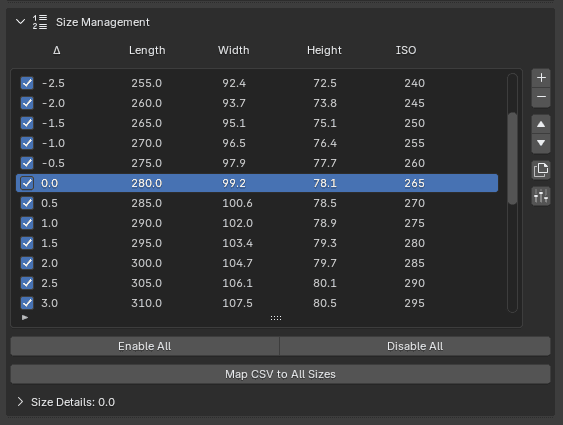
Step 2
Define Your Size Run
Map your CSV cells to each size entry — length, width, height, and standard size pull in automatically. Enable or disable individual sizes, reorder the run, and set your spacing before grading begins.

Step 3
Grade and Export
Hit Grade Them All and watch the full size run build in real time, organized into clean per-size collections. When the run is complete, bake the lattice deformation and hand off manufacturing-ready files.
Step 2
Define Your Size Run
Map your CSV cells to each size entry — length, width, height, and standard size pull in automatically. Enable or disable individual sizes, reorder the run, and set your spacing before grading begins.
Step 3
Grade and Export
Hit Grade Them All and watch the full size run build in real time, organized into clean per-size collections. When the run is complete, bake the lattice deformation and hand off manufacturing-ready files.
Pricing
One tool to
grade-them-all.
One tool to
grade-them-all.
Lifetime license
One-time purchase
For designers, brands, technologists, everyone.
€69
€69
/forever
What you get
Full access to all the features
One license for up to 3 devices
Sizing sheet in XLSX format included
Complete CSV size mapping set-up
Lifetime license
One-time purchase
For solo developers and early product experiments worldwide.
€69
€69
/forever
What you get
Full access to all the features
One license for up to 3 devices
Sizing sheet in XLSX format included
Complete CSV size mapping set-up
FAQs
Got questions?
We’ve got answers.
Got questions?
We’ve got answers.
Got questions?
We’ve got answers.
Still have questions?
Contact us and we’ll help you out.
01
Does the tool work with any shoe construction, or only specific types?
The tool works with any mesh geometry — lasted constructions, vulcanized, cup sole, boots, sandals. As long as your sample has a last, a lattice cage, and an optional mesh collection, the grading system will process it. There are no assumptions about construction type built into the tool.
02
Do I need to know how to write Python or scripts to use it?
Not at all. The entire tool lives inside Blender's N panel as a standard UI — reference pickers, dropdowns, CSV browser, and a single button to run the full grading operation. No scripting knowledge is required at any stage.
03
What happens to my original sample size, does grading overwrite it?
Never. The tool only reads from your sample references and creates new objects. Your original last, mesh collection, and lattice remain completely untouched throughout the entire process.
04
Can I use my own sizing standard, or am I locked into Mondopoint?
Any standard works. The tool reads size labels and values directly from your CSV file — whatever naming convention your factory or brand uses gets pulled in and applied to every generated size automatically.
05
Is the tool compatible with the latest version of Blender?
The tool is actively maintained for Blender 4.x and 5.0 alpha. It relies exclusively on native Blender systems — lattices, collections, geometry nodes, and the Python API, with no external dependencies, which keeps compatibility straightforward across updates.
01
Does the tool work with any shoe construction, or only specific types?
The tool works with any mesh geometry — lasted constructions, vulcanized, cup sole, boots, sandals. As long as your sample has a last, a lattice cage, and an optional mesh collection, the grading system will process it. There are no assumptions about construction type built into the tool.
02
Do I need to know how to write Python or scripts to use it?
Not at all. The entire tool lives inside Blender's N panel as a standard UI — reference pickers, dropdowns, CSV browser, and a single button to run the full grading operation. No scripting knowledge is required at any stage.
03
What happens to my original sample size, does grading overwrite it?
Never. The tool only reads from your sample references and creates new objects. Your original last, mesh collection, and lattice remain completely untouched throughout the entire process.
04
Can I use my own sizing standard, or am I locked into Mondopoint?
Any standard works. The tool reads size labels and values directly from your CSV file — whatever naming convention your factory or brand uses gets pulled in and applied to every generated size automatically.
05
Is the tool compatible with the latest version of Blender?
The tool is actively maintained for Blender 4.x and 5.0 alpha. It relies exclusively on native Blender systems — lattices, collections, geometry nodes, and the Python API, with no external dependencies, which keeps compatibility straightforward across updates.